How can I determine if my computer/operating system is 64-bit?
|
Title
|
|
How to determine if your OS is 64-bit compliant
|
|
Author
|
Pete Huckelba, StataCorp
|
Windows
Windows 10: press the 'Windows' key on your keyboard to open the Start
menu. Click on Control Panel. Click on System. The System type:
line will detail the operating system type:
Windows 8: press the 'Windows' key on your keyboard to return to the Start
screen. Type control panel and press enter to launch. Click
on System and Security -> System. The System type:
line will detail the operating system type:
Windows 7: click Start -> Control Panel -> System
and Security -> System. The System type: line will
detail the operating system type:
Windows Vista (Windows Vista is no longer supported by Stata, but we leave this information
here for completeness): click Start -> Control Panel ->
System and Maintenance -> System. The System type:
line will detail the operating system type:
Windows XP (Windows XP is no longer supported by Stata, but we leave this
information here for completeness): click Start -> Run and type dxdiag.
If a Windows dialog box is displayed asking if you want to verify your
drivers, you can safely click No and continue. When the program has
finished loading, you should see something similar to one of the following
images:
The Operating System line refers to Windows <some
version> x64 or 64-bit edition. The last image above specifies the processor
Itanium, which is a 64-bit processor.
As of Stata 16, only 64-bit Windows is supported.
Mac
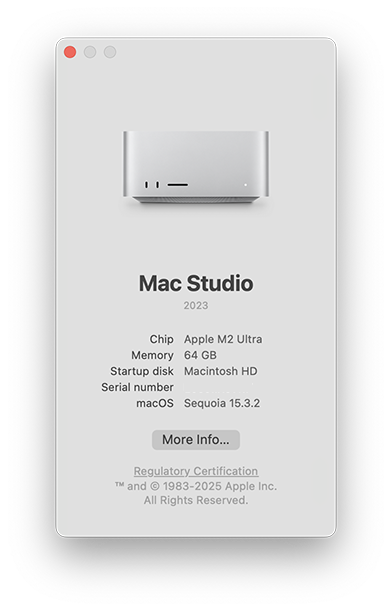
Select About this Mac from the Apple menu. The text beside
macOS will give the operating system version, and the
Processor line will detail the processor type.
macOS is a 64-bit operating system. Stata for Mac is available
for both Macs with Apple Silicon and Macs with Intel processors.
All currently shipping Macs have a 64-bit processor and a 64-bit operating
system.
Linux
Linux users should type the uname command. Depending on the
platform, you may see
[cph@adkins ~]$ uname -a
Linux adkins.stata.com 2.6.32-504.12.2.el6.i686 #1 SMP Wed Mar 11 19:05:53 UTC 2015 i686 i686 i386 GNU/Linux
[cph@charlotte ~]$ uname -a
Linux charlotte.stata.com 2.6.32-504.12.2.el6.x86_64 #1 SMP Wed Mar 11 22:03:14 UTC 2015 x86_64 x86_64 x86_64 GNU/Linux
In the above listing, 'charlotte' (x86_64 GNU/Linux) is 64-bit compliant, 'adkins' (i386 GNU/Linux) is only a 32-bit platform.
Unix (Oracle (Sun) Solaris, IBM-AIX)
- Oracle (Sun) Solaris (Solaris is no longer supported by
Stata, but we leave this information here for completeness)
Sun's platforms transitioned to 64-bit over a period of time, making
identifying the platform for 64-bit compliance tricky. Sun has stated:
Sun has implemented its 64-bit operating system in phases. The Solaris
2.5 Operating Environment provided support for increased precision with
64-bit math and also included support for 64-bit asynchronous I/O. The
Solaris 2.6 Operating Environment added support for large datasets with
large (1 Terabyte) filesystems while allowing co-existence of 32-bit and
64-bit files. Beginning with the Solaris 7 Operating Environment, Sun
introduced support for large virtual address spaces with a full 64-bit
operating system. Sun began shipping 64-bit hardware in 1995. By phasing
in operating system support for 64-bits Sun has provided 64-bit features
as the market has demanded them while guaranteeing compatibility for
existing 32-bit applications.
To determine what kind of binaries your Solaris machine can run, try the following:
eden:/home/cph: isainfo -v
64-bit sparcv9 applications
32-bit sparc applications
You can see that this Solaris machine is capable of running 32-bit as well
as 64-bit applications. If isainfo fails, running a 64-bit
application on your Sun will generally not be possible, unless of course
isainfo is not in your path or has not been installed. You can also
use the uname command to glean more information:
eden:/home/cph: uname -a
SunOS eden 5.8 Generic_108528-05 sun4u sparc SUNW,Ultra-5_10
lagrange:/usr/users/cph: uname -a
SunOS lagrange 5.5.1 Generic_103640-29 sun4u sparc SUNW,Ultra-1
SunOS/Solaris versions map to the following:
| SunOS |
SOLARIS |
| 5.3 |
2.3 |
| 5.4 |
2.4 |
| 5.5 |
2.5 |
| 5.5.1 |
2.5.1 |
| 5.6 |
2.6 |
| 5.7 or greater is 64-bit compliant |
2.7 or greater is 64-bit compliant |
While all UltraSparc processors are capable of 64-bit computing, the OS
release level may be the limiting factor. In the above excerpt, 'eden'
(SunOS 5.8) is a fully compliant 64-bit platform, and 'lagrange' (SunOS
5.5.1) is a 64-bit UltraSparc limited to 32-bit computing.
- IBM-AIX (IBM-AIX is no longer supported by Stata, but we leave this
information here for completeness)
The getconf command will return the configuration of your machine.
Since you are looking only for the kernel parameters, you should type
[cph@anna ~]$ getconf -a | grep KERN
KERNEL_BITMODE: 64
If that fails or does not return a result, try the file command.
[cph@anna ~]$ file /usr/lib/boot/unix*
/usr/lib/boot/unix: 64-bit XCOFF executable or object module not stripped
/usr/lib/boot/unix_64: 64-bit XCOFF executable or object module not stripped
/usr/lib/boot/unix_mp: executable (RISC System/6000) or object module not stripped
/usr/lib/boot/unix_up: executable (RISC System/6000) or object module not stripped
[cph@ozona ~]$ file /usr/lib/boot/unix*
/usr/lib/boot/unix: symbolic link to /usr/lib/boot/unix_up.
/usr/lib/boot/unix_kdb: executable (RISC System/6000) or object module not stripped
/usr/lib/boot/unix_up: executable (RISC System/6000) or object module not stripped
We can see that 'anna' is a 64-bit capable platform, and 'ozona' is only 32-bit.


)
)
)
)
)
)
)